
TV Planner1.4 - Get APK
You'll be able to download in few seconds.
Publisher Description
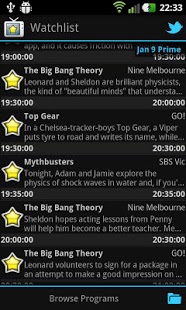
TVPlanner is an XMLTV aggregator and EPG app that gives you the most efficient way to browse TV programs and plan your watch list.
With it you can browse programs not only by channels but also by categories. Adding and removing programs to and from your watch list is as easy as a single click. TV Planner will remind you to switch channel 15 seconds before the program starts so you won't miss a thing.
With 1.1 update, you can also send tweets about the program you like without leaving the app and see what other people are discussing about them. No login or authorisation is required, all you need is the official twitter app installed on your device. Please keep the hash tags suggested by the app and mention @tvpap in your tweets in order for the app to find your tweets and so other people can see it and join the discussion.
TVPlanner does not publish or distribute program data & schedules. Instead it reads xml files in standard XMLTV format published by 3rd party as its data source. Which means TV Planner as merely a tool that reads from data sources, does not control the content of data sources nor does it take any responsibility for them. But it also means you can find plenty of TV guide resources online or even create your own data source with free grabber tools.
TVPlanner has already included data sources that covers Freeview channels in Australia as well as some other popular channels. For users outside Australia, you can easily add your own data sources or email me to suggest data sources to be included in the app.
About TV Planner
The company that develops TV Planner is Idea Matters. The latest version released by its developer is 1.4.
To install TV Planner on your Android device, just click the green Continue To App button above to start the installation process. The app is listed on our website since 2013-03-10 and was downloaded 0 times. We have already checked if the download link is safe, however for your own protection we recommend that you scan the downloaded app with your antivirus. Your antivirus may detect the TV Planner as malware as malware if the download link to com.ideamats.tvplanner.android is broken.
How to install TV Planner on your Android device:
- Click on the Continue To App button on our website. This will redirect you to Google Play.
- Once the TV Planner is shown in the Google Play listing of your Android device, you can start its download and installation. Tap on the Install button located below the search bar and to the right of the app icon.
- A pop-up window with the permissions required by TV Planner will be shown. Click on Accept to continue the process.
- TV Planner will be downloaded onto your device, displaying a progress. Once the download completes, the installation will start and you'll get a notification after the installation is finished.
Program Details
System requirements
Download information
Pricing
Version History
version 1.4
posted on 2013-03-10
Now with Twitter integration!,You can send tweets about programs you like without leaving the app and see what people are discussing about them! Check out the screenshots.,No login or authorisation required, all you need is the official twitter app installed on your device.,New feature: Share your channel selection to your friends.
version 1.4
posted on 2013-03-10
Several fixes and updates
Disclaimer
External Download
We do not host TV Planner on our servers. We did not scan it for viruses, adware, spyware or other type of malware. This app is hosted by Galad and passed their terms and conditions to be listed there. We recommend caution when installing it.
The APK Download link for TV Planner is provided to you by apps112.com without any warranties, representations or guarantees of any kind, so access it at your own risk.
If you have questions regarding this particular app contact the publisher directly. For questions about the functionalities of apps112.com contact us.
